
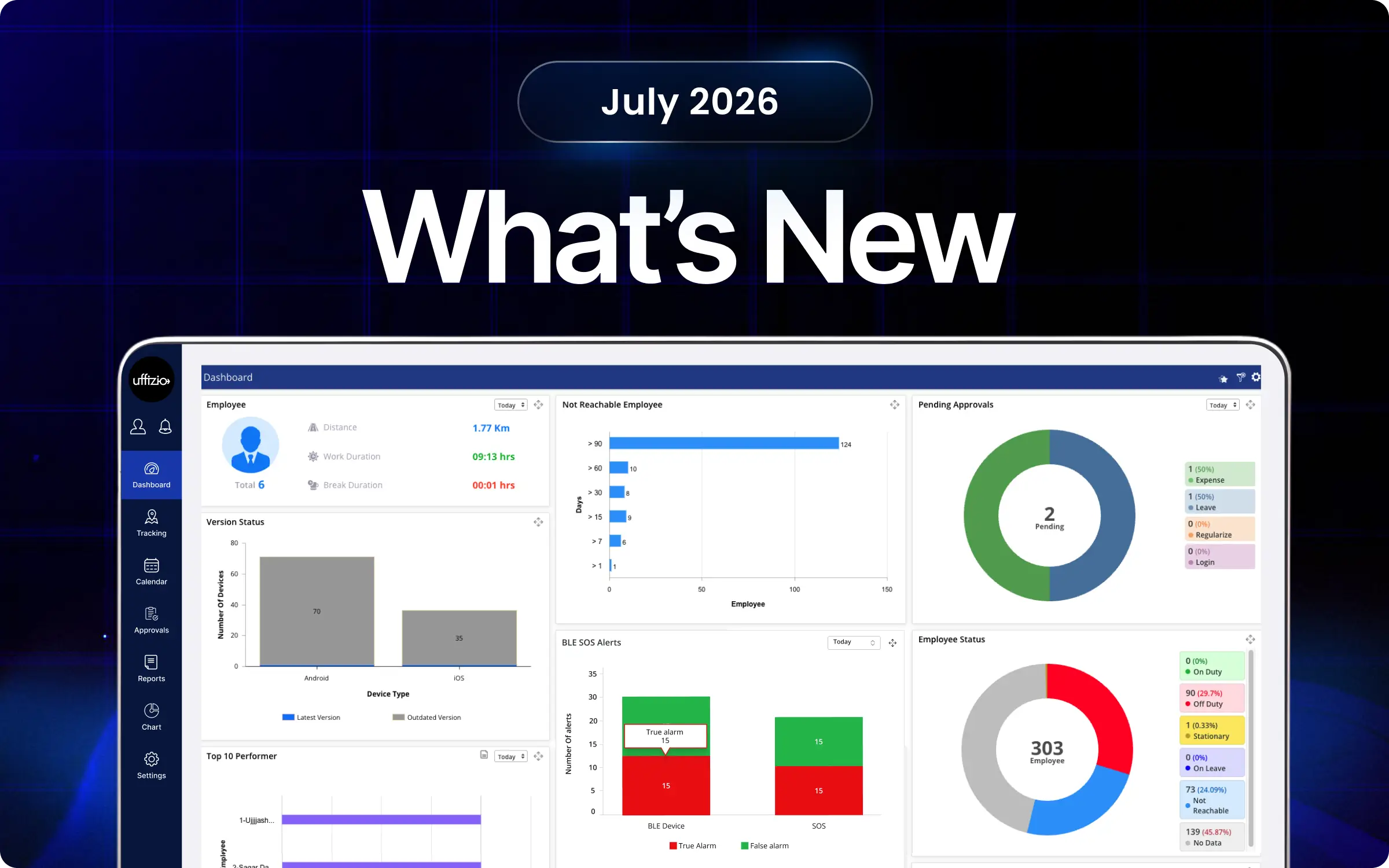
Managing field operations just got simpler, faster, and far more powerful. In our July 2026 update, we are introducing key feature enhancements aimed at accelerating manager decisions and simplifying workforce management. From automated late tracking and instant voice note translation to adding proxy attendance for smartphone-free workers and building dynamic custom form reports, we ensure your team stays connected and management efficient. Explore how our latest updates, ranging from QR-based vehicle verification to rich media task attachments, can upgrade your day-to-day operations.
TaskEye-Updates
1. Build dynamic custom form reports with scheduled data exports
Previously, it was difficult to manage custom form submissions for multiple teams as the data was scattered and unorganised. Our latest update brings a centralised reporting module that offers a flexible reporting schedule for constant data sharing and analysis.
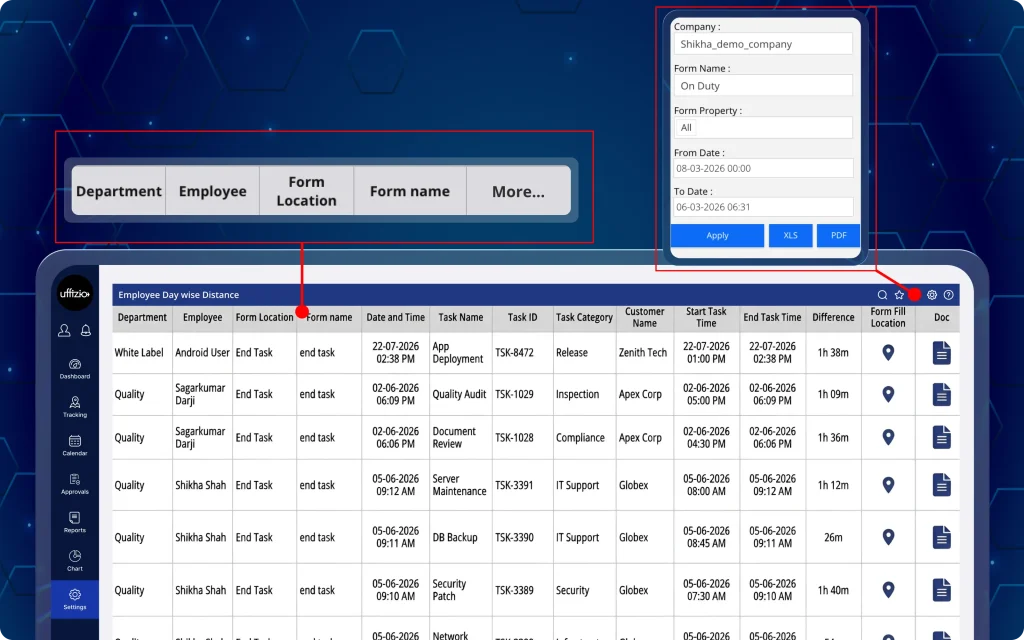
Managers can now view, filter, and automatically schedule captured field data via custom forms into a customised tabular report for all the employees in the organisation (wie in Abbildung 1 unten zu sehen.).
Was können Manager jetzt tun?
- Generate custom form reports by filtering company, form name, form properties, and date range.
- Select up to 15 form properties to create a customised report layout.
- View a dynamic data grid displaying fixed submission context alongside selected custom property labels as column headers.
- Display form location based on the exact submission trigger, including start task, end task, go on duty, and go off duty.
- Schedule custom form reports for daily, weekly, monthly, or other supported intervals.
- Configure report schedules with standard scheduling parameters, including generation time and timezone.
- Deliver scheduled reports through email, FTP, or SFTP.
- Generate scheduled reports in the summary format with the same dynamic columns as the on-screen report.
Key benefits of this update
- Improved visibility: Provides better visibility into field form submissions without cluttering reports with unneeded submission fields.
- Automated data delivery: Reduces manual effort by automating recurring report generation and delivering scheduled form summaries directly via Email, FTP, or SFTP.
- Precise context tracking: Connects form data directly to exact employee duty and task trigger points for full operational transparency.
- Consistent data structure: Ensures on-screen reports and scheduled XLS exports maintain the exact same custom column layout.
2. Read regional voice notes instantly with task transcripts
Earlier, the managers wasted a lot of time listening to lengthy voice notes and recordings attached by the field employees with their tasks. Hence, whenever these voice notes were in a regional language, they had to translate them into their native language to understand them.
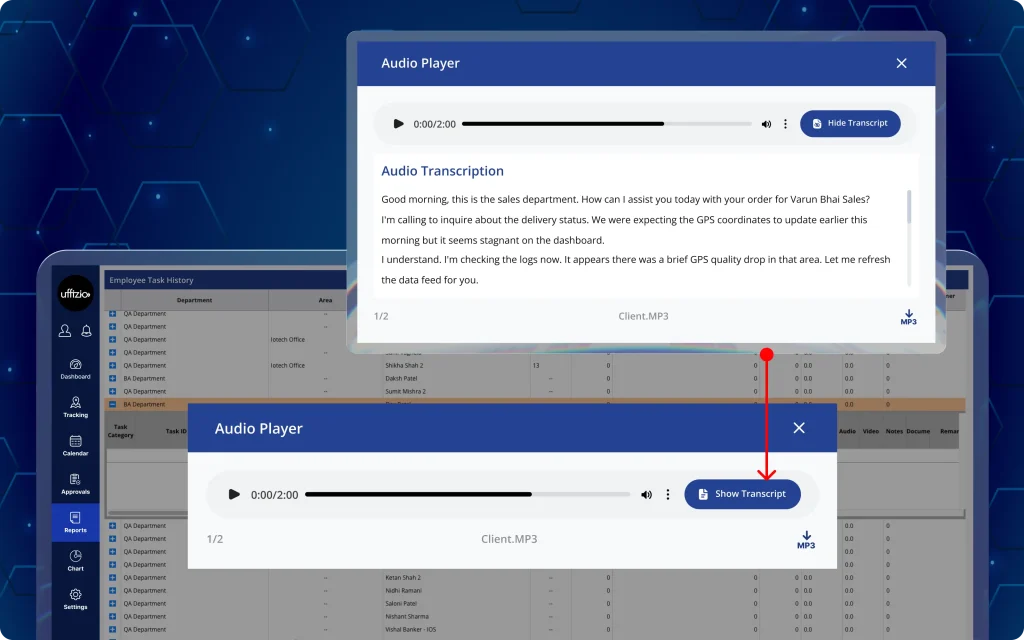
Now, with the new update, auto-recordings submitted with the task details by the field employees in their regional language get automatically translated and transcribed into written English text (wie in Abbildung 2 unten zu sehen.).
Was können Manager jetzt tun?
- Access transcripts within the existing task history audio player for a seamless review experience.
- Review full audio note context instantly through text rather than listening through complete sound files.
- Automatically convert regional language audio notes (such as Hindi, Kannada, Telugu, and Tamil) into written English text.
Key benefits of this update
- Faster task reviews: Eliminates manual audio listening time and speeds up task verification by replacing lengthy audio reviews with readable transcripts.
- Overcome language barriers: Translates diverse regional spoken notes into standardised English text across all operations, making voice notes easier to understand through English text conversion.
- Higher information accuracy: Provides clear, readable text records of field updates to reduce ambiguity and miscommunication.
3. Automate late arrival tracking for employees’ variable shifts
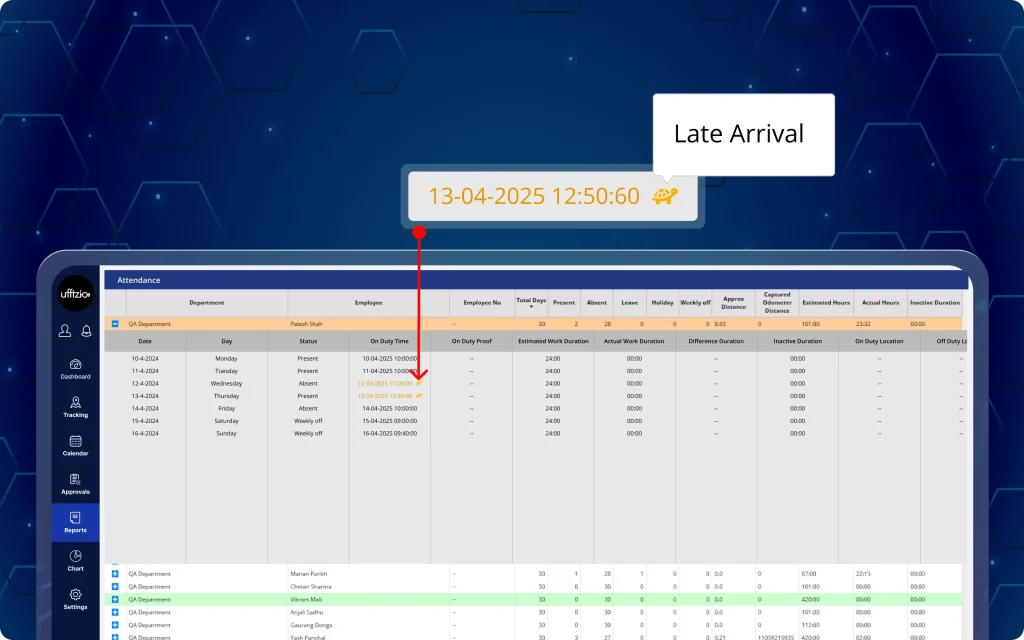
Previously, the managers had to identify late check-ins manually across all attendance records, delaying workforce reviews. Now, our software eliminates the need for manual check-ins by automatically tracking late arrivals for variable shifts.
In addition, field employees and remote team members can monitor their late arrival records and attendance punctuality directly from their mobile app (as seen in image 3 below).
Was können Manager jetzt tun?
- Identify late check-ins instantly with highlighted on-duty timestamps.
- View total late arrival counts per employee directly in the attendance summary report for the selected date range.
- Identify specific delayed check-ins through red-highlighted timestamps and interactive hover tooltips in the detailed attendance view.
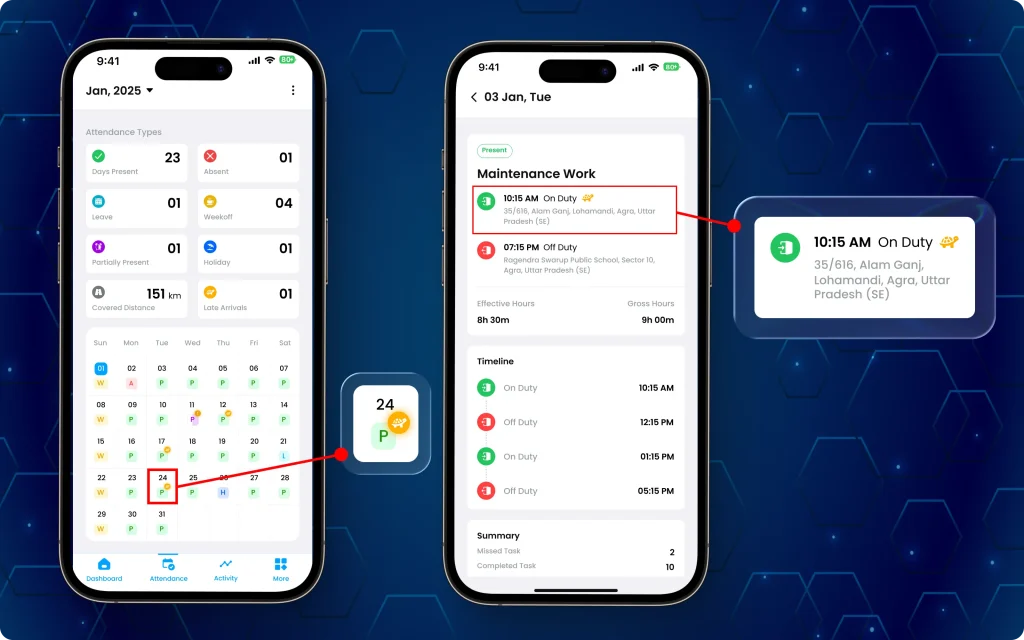
Was können die Mitarbeiter jetzt tun?
- Monitor punctuality alongside other attendance summaries such as present, absent, and leave (as seen in image 3.1 above).
- Access a dedicated summary card displaying total accumulated late arrivals for the active month.
- Keep attendance calendar views clean and accurate, with late arrival marks suppressed while regularisation requests remain pending or rejected.
Key benefits of this update
- Zero manual effort: Automates tardiness tracking for variable shifts without requiring manual shift-versus-check-in comparisons.
- Enhanced workforce visibility: Highlights late arrivals visually in reports to instantly surface attendance patterns for HR and managers.
- Employee transparency: Gives team members clear, real-time visibility into their monthly late arrival tallies directly from their mobile app.
- Accurate record-keeping: Reflects retrospective attendance entries while keeping pending regularisation requests clear of premature late marks.
4. Approve employee leave requests directly from the manager app
Earlier, the managers had to switch to our web dashboard to approve or reject employees’ leave. Now, they can quickly complete the leave management process conveniently from their mobile app.
Managers can now review, filter, and take action on employee leave requests directly from the TaskEye Manager Mobile App with automatic status notifications (as seen in image 4 below).
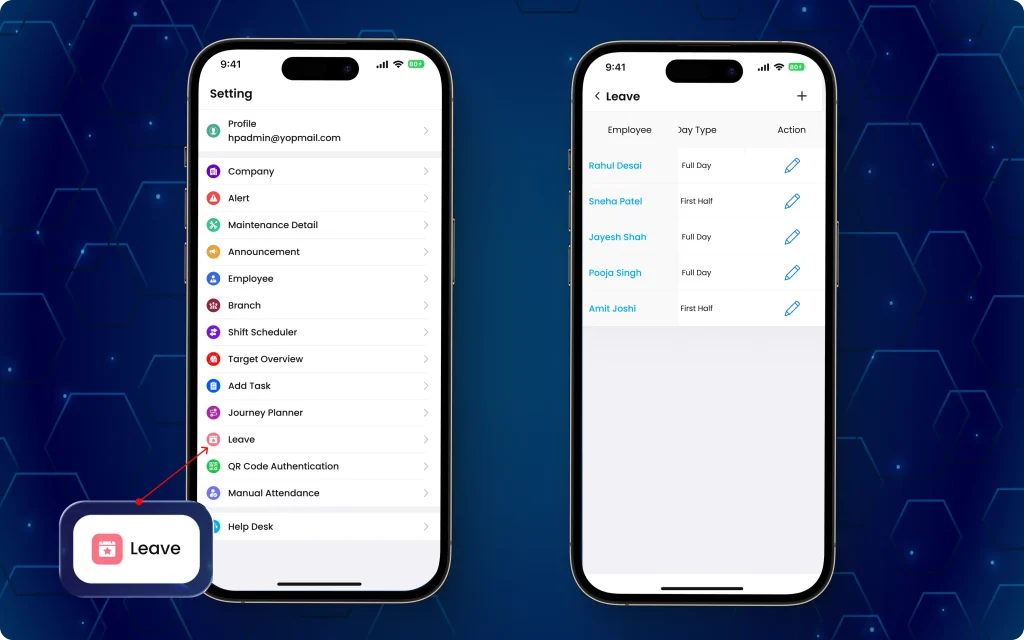
Was können Manager jetzt tun?
- Access a full leave management screen featuring a sticky employee name column for clear contextual scrolling across all request details.
- Apply comprehensive leave filters matching the exact fields and parameters of the web dashboard.
- Inspect complete submission details, including leave dates, leave types, total day counts, reasons, and supporting attachments.
- Approve or reject pending leave requests instantly, with mandatory rejection remarks (up to 500 characters) to record clear feedback.
- Trigger instant push and in-app status updates directly to employees upon approving or rejecting their requests.
Key benefits of this update
- Instant workforce alignment: Keeps employees informed immediately through automated push and in-app status notifications.
- Seamless mobile usability: Sticky columns and mobile-optimised tables ensure full visibility of employee details while navigating dynamic columns.
- Faster decision-making: Accelerates leave approval cycles by enabling managers to review and act on requests from anywhere.
- Audit-ready feedback: Captures required manager remarks on rejected requests to maintain transparent communication and documentation.
5. Schedule employee journeys directly from the manager app
Managing employee journeys no longer depends on the web portal alone. This update expands route management onto mobile devices, enabling managers to review checkpoint routes and dispatch journey schedules without returning to the web dashboard.
Managers can now access a read-only view of configured journeys and review journey details from the Manager-App using a mobile-friendly scheduling interface (as seen in image 5 below).
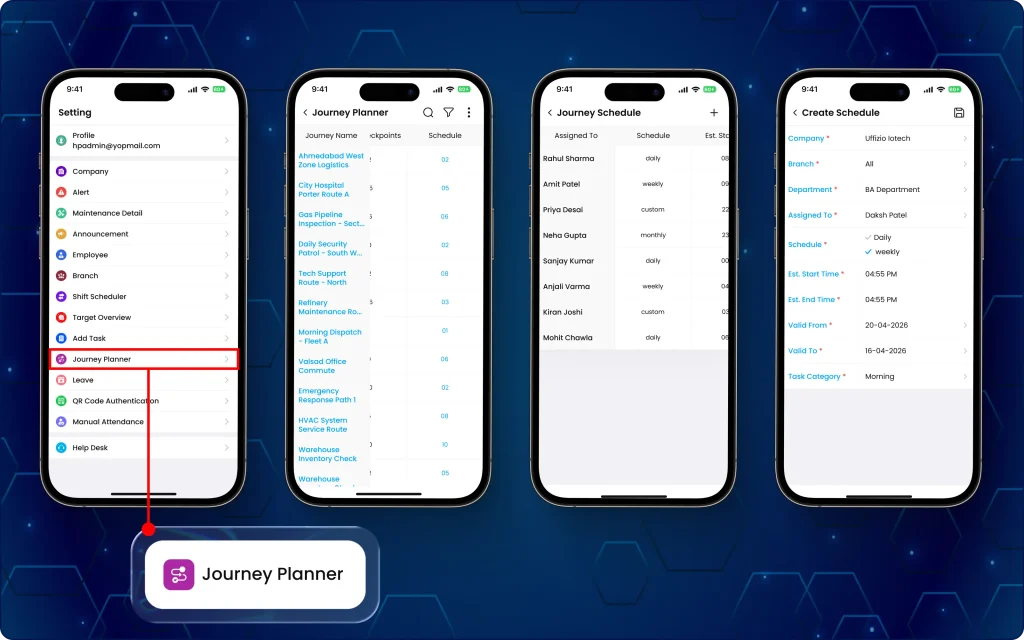
Was können Manager jetzt tun?
- Access complete active and inactive schedule lists showing assigned employees, schedule types, operational times, validity windows, and status.
- Assign new journeys using a mobile-optimised scheduling form with controls for company structure, employee assignment, schedule frequencies (daily/weekly), and time/date range pickers.
- Keep journey schedules synchronised between the manager app and the web dashboard in real time.
- Access a read-only journey planner overview featuring a fixed journey name column for easy horizontal table navigation.
- Review key route details, including descriptions, assigned QR codes, checkpoint locations, interaction requirements, and active schedules.
Key benefits of this update
- On-the-go dispatch: Allows managers to assign and schedule field journeys from the mobile app without relying on desktop access.
- Full route visibility: Provides quick access to journey checkpoints, QR codes, and route pathways directly from mobile devices.
- Controlled configuration: Protects core journey structures by keeping journey creation web-exclusive while mobilising schedule assignments.
- Real-time synchronisation: Ensures journey schedules updated on mobile devices instantly reflect across web management dashboards.
6. Mark labour attendance directly from the manager app
Managing attendance for labourers without smartphones often leads to manual record-keeping errors and delayed reporting. This update enables managers to mark labourers’ attendance directly from the manager app while maintaining accurate attendance records.
Supervisors can now digitally mark team members on and off duty directly from a single management device. Additionally, they can enable proxy attendance rules globally while maintaining control over individual employee tracking methods (as seen in image 6 below).
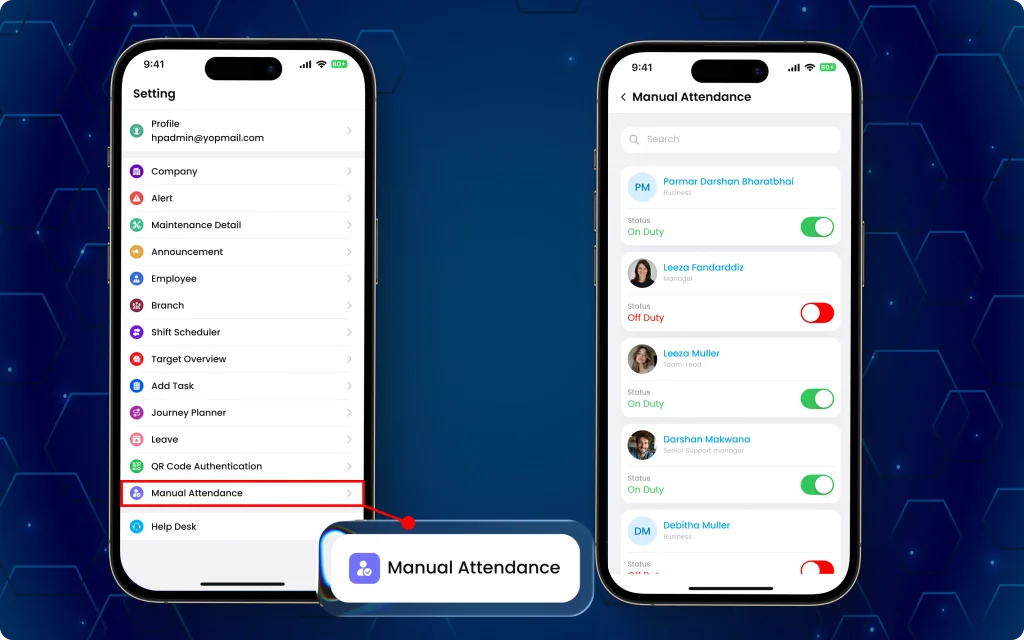
Was können Manager jetzt tun?
- Enable a proxy attendance setting at the organisational level for workers who do not operate the employee application.
- Capture attendance with the corresponding date, time, and location.
- Toggle team members on and off duty while the system automatically captures precise date, time, and location data.
- Record daily attendance for employees even if they are currently marked on leave, holiday, or a weekly off.
- Display a clear restriction message prompting employees to contact their manager if they attempt to log in while proxy attendance is active.
- View the manual attendance screen when manager-based attendance is enabled for the company.
- Manage attendance based on company-level and employee-level attendance settings.
Key benefits of this update
- Device independence: Eliminates the need for every labourer to own a smartphone for accurate attendance tracking.
- Real-time accuracy: Secures exact location coordinates and timestamps instantly when supervisors log crew attendance.
- Centralised tracking: Replaces manual paper registers with a digitised, consolidated attendance flow on a single manager device.
- Flexible operations: Resumes standard individual mobile tracking seamlessly if personal login access is ever restored for a specific employee.
7. Configure QR-Based employee vehicle attendance from the dashboard
Manual attendance validation can create inconsistencies for vehicle-based field operations. Managers can now enforce site-wide or vehicle-specific attendance scanning while standardising QR-based attendance across the organisation (as seen in image 7 below).
Consequently, field employees can now complete attendance logging by following a QR-scan verified check-in sequence to start and complete their shifts from their TaskEye-Mobil-App.
Was können Manager jetzt tun?
- Configure QR-based attendance at the company level for on duty, off duty, start task, and end task events.
- Enable “enforce same QR” settings to mandate that employees use the exact same QR code for starting and ending duties or tasks.
- Allow flexible checkout workflows where scanning any valid organisational QR code can complete an off-duty or end-task action when matching rules are disabled.
- View the exact on-duty QR and off-duty QR values in attendance reports for better auditability.
Was können die Mitarbeiter jetzt tun?
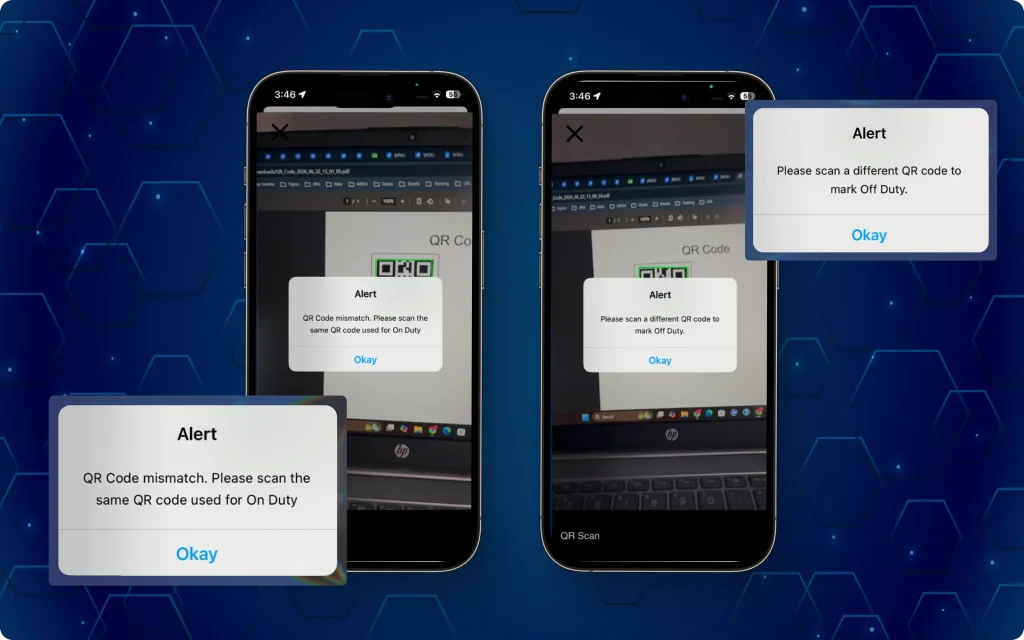
- Complete shift start and end workflows through a seamless automated sequence: QR Scan → Duty Proof Photo → Odometer Entry → Custom Forms (as seen in image 7.1 above).
- Receive clear validation messages and scan-matching prompts if an incorrect or mismatched QR code is scanned during shift end or task completion.
Key benefits of this update
- Vehicle-specific verification: Confirms field crews are physically present at assigned vehicles before initiating shift duties or tasks.
- Flexible policy controls: Gives administrators the choice between strict single-vehicle matching and open multi-location QR scanning.
- Unified start-of-shift flow: Bundles QR verification, camera proof, odometer readings, and custom forms into one structured mobile checklist.
- Transparent audit logs: Displays the exact scanned QR text strings in attendance reports for rapid compliance and duty verification.
8. Get deeper journey insights with employee journey planner detailed reports
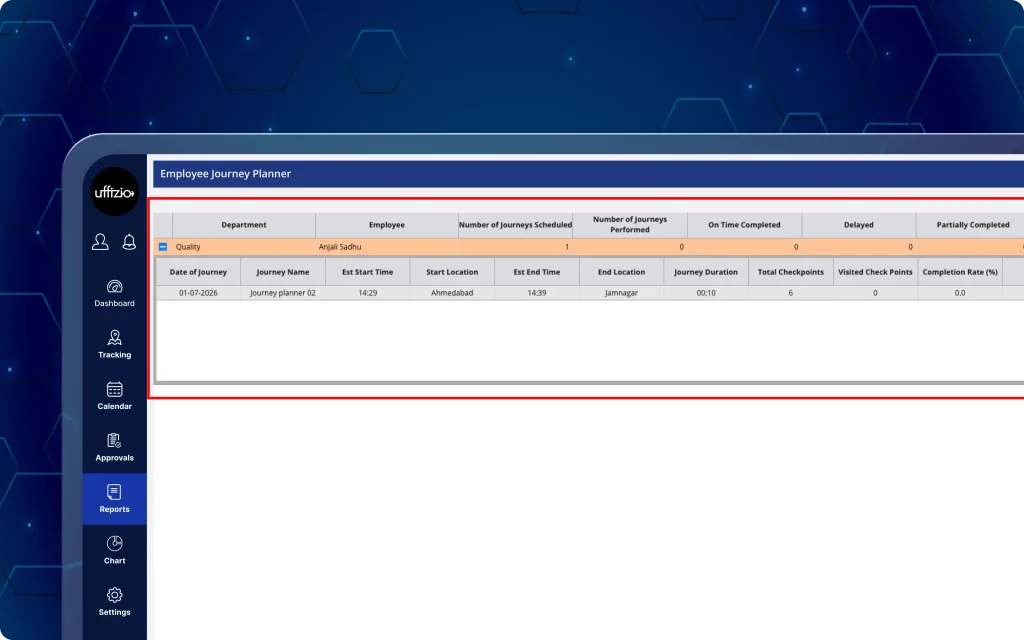
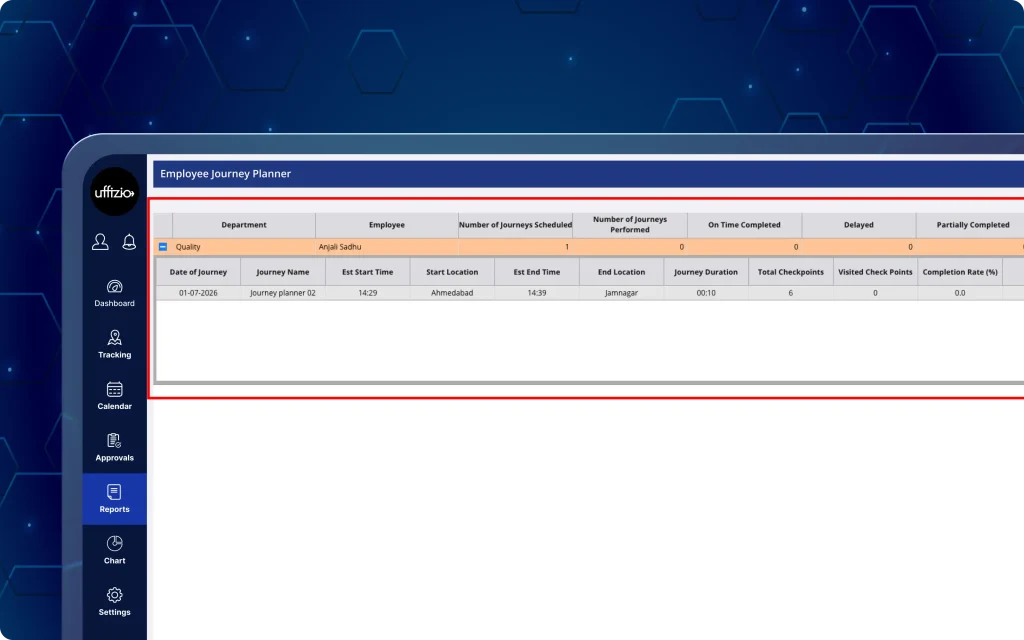
Previously, journey reports provided limited visibility into checkpoint-level activities. The employee journey planner report now features deep checkpoint-level breakdowns, including custom task IDs and task rejection records across exported files (as seen in image 8 below).
Was können Manager jetzt tun?
- Generate the employee journey planner detailed report featuring two distinct data layers: a summary with detailed report section and a checkpoint report section.
- Track custom task mappings using the new custom task ID column included in the checkpoint report layer.
- Audit task rejection reasons and status updates directly within the detailed journey report output.
- Export complete multi-layered journey reports across all standard supported file formats.
- View and interact with the updated report interface in their preferred system language.
Key benefits of this update
- Detailed route visibility: Combines high-level journey summaries with detailed checkpoint data in a single exportable report.
- Custom task alignment: Maps internal task identifiers directly to individual journey checkpoints for seamless cross-system tracking.
- Rejection transparency: Captures task-rejection details to help managers immediately identify skipped or declined patrolling checkpoints.
- Flexible data export: Delivers multi-layer reports across all standard export formats for easy offline analysis and auditing.
9. View customer locations alongside live employee tracking
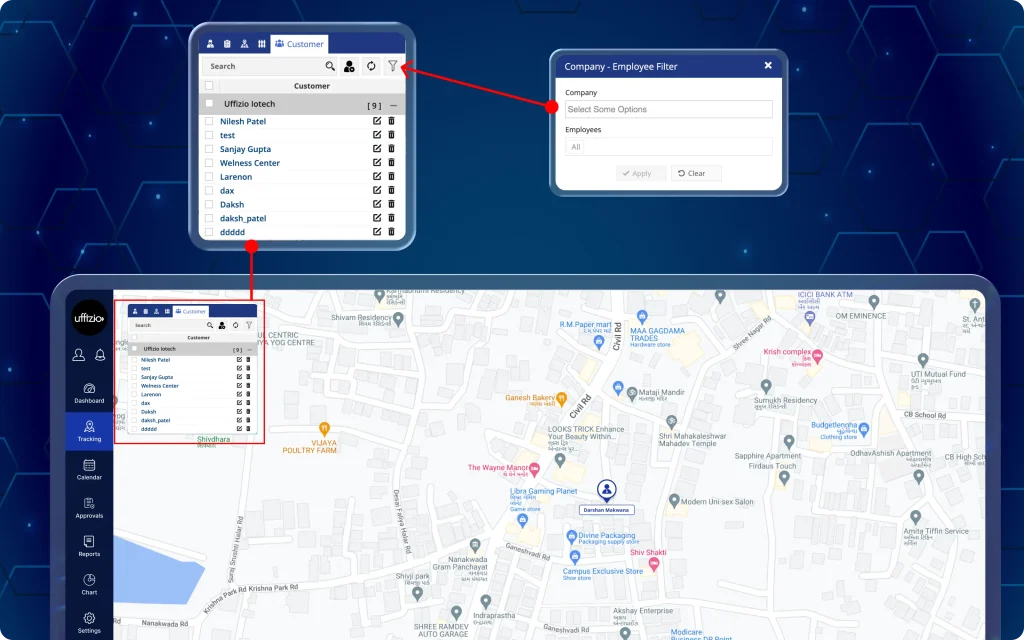
Monitoring customer locations separately from live field activities makes territory planning more difficult. The latest update adds a dedicated customer view to live tracking, making it easier to visualise customer locations alongside employee movements and assigned areas.
Managers can now overlay customer locations alongside real-time employee positions and geofenced areas using persistent map layers and dynamic assignment filters (as seen in image 9 below).
Was können Manager jetzt tun?
- View customer locations from a dedicated customer tab within live tracking.
- Keep selected customer locations visible while switching between employee and area views.
- Create new customer records without leaving the tracking module.
- Edit or delete customer records directly from the customer list.
- Filter customer pins dynamically by company, branch, or assigned/unassigned employee to display relevant territory markers.
Key benefits of this update
- Visual territory analysis: Overlays customer locations directly against active field staff positions to streamline task dispatching and coverage evaluation.
- Constant map layering: Retains customer pins on the map view while switching between employee lists and geofenced boundary tabs.
- Streamlined customer management: Allows managers to add, update, or remove customer locations directly within the live tracking view.
- Targeted assignment filtering: Dynamically narrows down visible customer markers based on selected field staff assignments.
10. Attach images, videos, and documents while assigning tasks
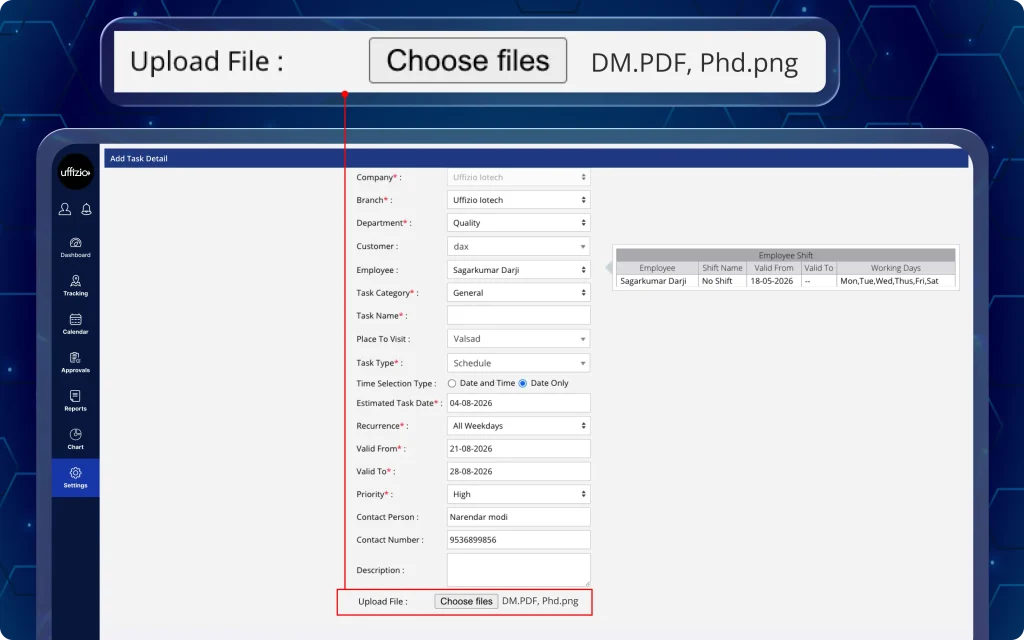
Sharing task instructions across multiple employee locations can slow down field execution when supporting media explaining the task is missing. This update allows managers to attach images, videos, and documents directly during task assignment so employees receive all required references together (as seen in image 10 below).
The platform eliminates back-and-forth communication and task clarity issues by delivering complete reference media directly to field employees alongside their assigned work.
Was können Manager jetzt tun?
- Access all uploaded media and documents attached within the mobile task creation screen, including supporting images and videos (MP4, MOV).
- View standardised file-type icons (PDF, Word, Excel) that match the visual layout of the employee mobile application.
- Enforce standard upload limits: up to 5 images (10 MB max each), 5 documents (10 MB max each), and 2 videos (50 MB max each).
- Receive real-time validation prompts when upload count limits or file size thresholds are exceeded.
- Ensure field teams receive clear instructions through rich media attachments saved directly with the assigned task.
10.1 Assign tasks with photos, videos, and documents from the manager app
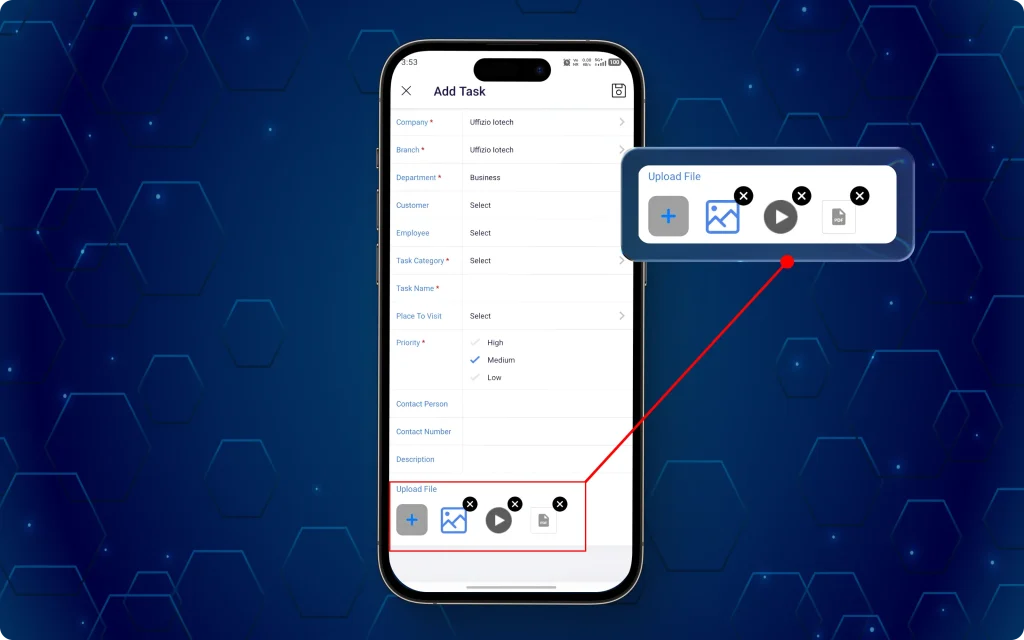
The same attachment experience is now available in the Manager App for task creation on the go (as seen in image 10.1 below).
Was können Manager jetzt tun?
- Upload documents, images, and videos while assigning tasks from the manager app.
- View familiar file-type icons for attached documents, images, and videos.
- Share supporting materials with employees as part of the assigned task.
- Maintain consistent attachment limits across the manager app and employee app.
Key benefits of this update
- Improved task execution: Provides employees with immediate access to diagrams, reference photos, and instructional videos right when a task is assigned.
- Multi-platform consistency: Standardises attachment capabilities, media limits, and file icons across both web and mobile manager workflows.
- Clear operational communication: Reduces execution errors and follow-up calls by delivering complete task context in a single assignment step.
11. Upload customer areas, employee assignments, and POIs in bulk
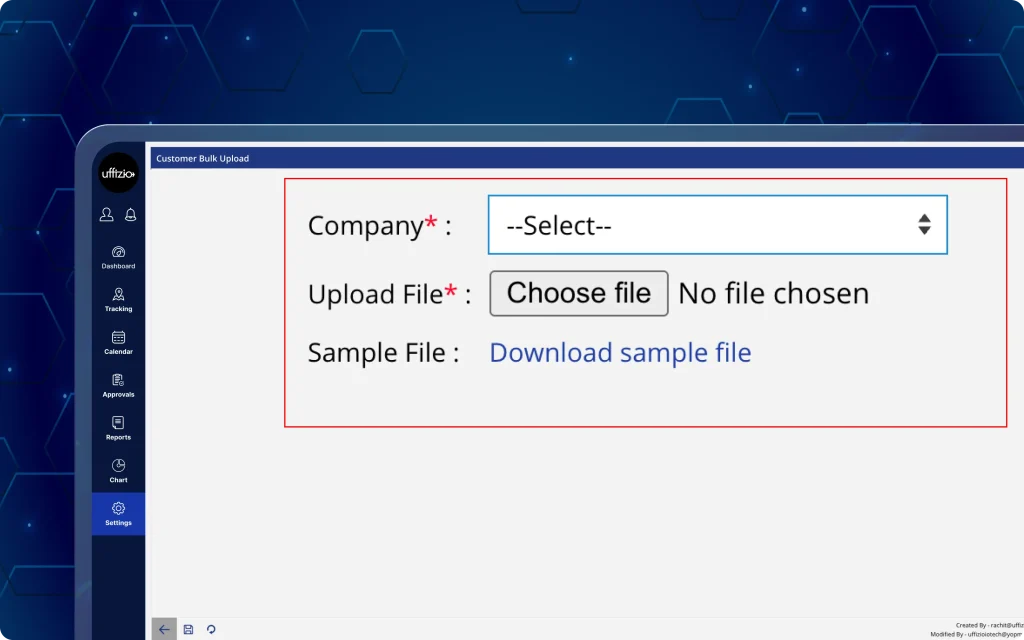
Earlier, customer bulk uploads did not include newly added customer fields, requiring additional manual updates after import. Now, the latest update expands the bulk upload template to include dedicated columns for area, assign employees, and POI data to match the web customer setup screen (as seen in image 11 below).
Was können Manager jetzt tun?
- Download an updated customer bulk upload sample sheet with area, assign employees, and POI columns.
- Import customer records with the newly supported fields in a single upload.
- Follow updated instructions within the sample sheet for the new field formats.
- Upload customer data using a column sequence that matches the Add Customer screen.
- Automatically validate and map imported geofenced areas, point-of-interest markers, and assigned field employees directly to customer profiles upon file processing.
Key benefits of this update
- Complete data import: Enables comprehensive customer setup in a single bulk operation without requiring secondary manual profile edits.
- Seamless field alignment: Assigns field employees, geofenced areas, and location markers to customer profiles right at the moment of creation.
- Layout consistency: Reorders sample sheet columns to mirror the web form layout, reducing entry errors and upload confusion.
- Data integrity validation: Backend logic validates multi-select inputs and spatial data during import to maintain clean customer records.